Freeway Field Reports
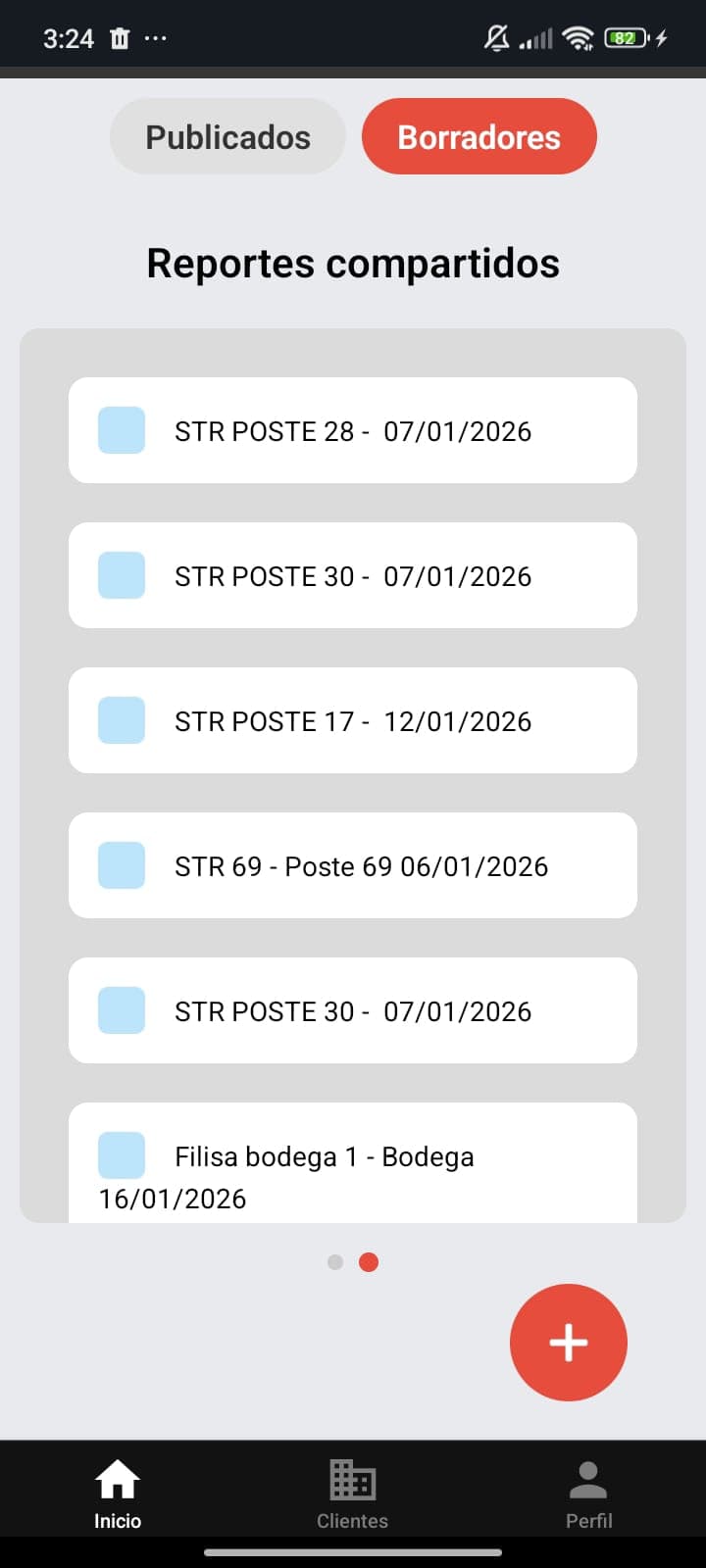
A React Native app that turns on-site incident reporting into structured, photo-rich PDFs for a telecom support team.
Role
Mobile Developer (collaboration with a senior engineer)
Industry
Telecommunications
Timeline
Iterative, task-based collaboration
Stack
7 technologies
What this project is
A senior engineer I knew brought me on to help build a mobile app in React Native, Expo, and Firebase. The client leads support at a telecommunications and Wi-Fi company and needed a way to log incident data in the field, attach photos to each report, and export everything to a printable PDF. We worked in a task-based rhythm, reviewing the app together to discuss improvements.
Context
Collaboration under a senior developer for Freeway, serving a telecom/Wi-Fi company's field support lead who documents on-site incidents.
Main goal
Replace ad-hoc incident notes with a fast, structured mobile reporting flow that produces clean, printable PDFs.
The problem — and the value delivered
Written for owners and stakeholders: what was broken, why it mattered, and what changed.
The problem
Field technicians needed to capture specific incident data on-site, attach photographs as evidence, and produce a shareable, printable record. Doing this manually is slow and inconsistent.
Why it mattered
In telecom support, a clear incident record is what closes a ticket and protects the company. Slow or messy reporting costs time on every single visit.
The solution
A mobile app that guides the technician through a structured report form, auto-completes fields from existing data, lets them snap and attach photos, and exports the finished report to PDF for printing.
Benefits delivered
- Structured, consistent incident reports from the field.
- Photos captured and embedded directly in each report.
- One-tap export to a printable PDF.
- Auto-completed fields that cut manual typing and errors.
Field-ready
Structured mobile reporting
Photo → PDF
Evidence embedded in reports
Autocomplete
Less typing, fewer errors
Architecture & implementation
Written for developers and recruiters: the technical decisions, tradeoffs, and lessons.
Architecture
A React Native + Expo app backed by Firebase (Authentication and Firestore). My focus areas were the report form interfaces, autocompletion that pulls data from Firebase through an API, base64 encoding of captured photos so they embed cleanly into the report and the exported PDF, and overall UI optimization.
Mobile
- React Native
- Expo
- TypeScript
Backend
- Firebase Auth
- Firestore
Output
- PDF Export
- Base64 image embedding
Workflow
- Git & GitHub
Implementation highlights
Field autocompletion via API
Report fields auto-complete by fetching reference data from Firebase, so technicians type less and make fewer mistakes.
Base64 photo embedding
Captured photos are decoded to base64 so they render reliably inside the report and the exported PDF, independent of device file paths.
PDF export
Structured reports export to a clean, printable PDF ready to hand off or file.
UI optimization
Focused work on the form UX and interface performance for fast, comfortable data entry in the field.
Challenges
Reliable images inside PDFs
Embedding on-device photos into a generated PDF is fragile across platforms. Base64 encoding made image rendering consistent end-to-end.
Fast data entry in the field
Technicians work quickly on-site, so autocompletion and a streamlined form were essential to keep reporting friction-free.
Lessons learned
- Collaborating under a senior engineer sharpened my code-review and iteration habits.
- Small UX decisions in a form add up to real time saved on every field visit.
What it does
Structured Reports
Guided forms for consistent incident data.
Photo Capture
Snap and attach photos to any report.
Autocomplete
Fields prefilled from Firebase via API.
PDF Export
One-tap printable report generation.
Secure Access
Authenticated with Firebase Auth.
Mobile-first
Built for fast on-site use.
Full technology stack
Want something like this for your business?
I turn manual, error-prone workflows into reliable software. Let's talk about what you need.
Start a conversation